The Secure Enclave is the security layer of abstraction around the SafeInsights and Research Containers that ensures the data can be accessed by the Research Container while a human cannot access it.
The Secure Enclave implementation may be different from Member to Member, depending on their datasets, infrastructure availability, and expertise. For example, a Member who is an Azure shop will likely provision their Secure Enclave in Azure.
DISCLAIMER This implementation guide outlines different methods for deploying infrastructure designed to enhance data protection and security. While following these guidelines may improve the safeguarding of data, it remains solely the Member’s responsibility to ensure the effective implementation and ongoing maintenance of their Secure Enclave, and monitoring, and ultimate security of their data . Members are advised to conduct their own assessments, maintain appropriate security practices, and stay informed about evolving threats to effectively protect their data and infrastructure.
Assumptions
This document assumes at this time that enclaves will not be hybrid or multi-cloud, and the data and enclave will be in the same cloud provider or on premise exclusively.
There are a few steps to architecting a Secure Enclave.
- Identify what data your organization will include in the enclave
- Determine how that data will be accessed by the a Researcher’s analysis code
Data Access
For WBS 1.10x.2: Data Access, you have been collecting information about the different datasets you are considering to make available in your enclave. This information will help inform the design of your Secure Enclave. To start, lets look at the dataset from an infrastructure and access perspective:
- Dataset 1
- Name: OpenStax Accounts
- Storage type: AWS RDS Database, Postgres 12
- Size: 100GB
- Weekly snapshots
- Private isolated networking
- Access notes and requirements
- Enclave shall not access DB directly
- Transform notes
- Transform required to remove first and last names
- Dataset 2
- Name: OpenStax Event Capture
- Storage Type: AWS S3
- Size: 250GB
- Version objects
- Access notes and requirements
- Enclave can read-only access directly enabled by bucket policy
- Transform notes
- Transform likely required to combine many tiny parquet files into fewer larger parquet files; likely in place.
With this information we can start to think about the infrastructure of our enclave. We know from our Data Access docs that both datasets need a transform before they are added to the enclave.
How the transform is performed on datasets is out of scope of this implementation guide, but the output of the transformation is required to design the enclave, i.e. AWS Glue can transform the RDS instance into another RDS Instance, or into an S3 bucket.
Now that the datasets and their infrastructure is known, the infrastructure for the enclave can be designed. Let consider our internal organization first:
- What are the current organizations’ data protection standards and requirements? What is the current skill set of the team who will deploy and maintain the enclave?
- What infrastructure deployment standards are required?
- Tags, Infrastructure as Code (IaC), lower tier environments
- Is there a separate Infrastructure team that must be involved to get infrastructure deployed?
- Security Team?
- Is there an internal template that must be followed?
- Are there other organization stakeholder reviews and approvals that will be required?
- Any other potential blockers that we need to consider before starting?
These requirements and how the datasets are made available to the Research Container will influence how the Secure Enclave is architected.
In general, if the dataset is provisioned inside the enclave's virtual private cloud, then the network controls will only need to prevent the Research Container from egressing from the virtual private cloud. If the dataset is separate from the enclave (in a different virtual private cloud), then the perimeter network controls around the Secure Enclave Containers must be strict enough to match the data protection standards around the data, but still allow access from the Research Container to the data.
Secure Enclave Applications and Resources
Applications
The Secure Enclave is made up of a minimum of four components: Setup App, Trusted Output App, Test Container and Research Container.
Setup App
https://github.com/safeinsights/setup-app
The Setup App is responsible for watching for approved studies in the Management App, pulling their Research Containers into the Secure Enclave, establishing their connections to Members' datasets, other within-enclave apps and long-term storage space, and running the Research Containers. This process is continual to support updates to in-progress studies.
Compute Requirements
- The Setup App has a requirement of 0.5 CPU, 1 GB of memory and 10 GB of ephemeral storage.
- The Setup App contains no state information and is only polling, launching, and reporting status.
Trusted Output App (TOA)
https://github.com/safeinsights/trusted-output-app
The Trusted Output App is responsible for securing the researcher's analysis results in order to be reviewed by the member in the Management App. Once the Research Container has completed its analysis of the data, it will send the analysis results to the the Trusted Output App to be encrypted and sent to the Management App for Member review.
Compute Requirements
- The Trusted Output App has a minimum requirement of 1 CPU, 2 GB of memory and 50 GB of persistent storage.
- More CPU and memory are required to run the encryption of the results.
- More storage is required so results can live for a short, configurable time on the TOA in case they need to be re-encrypted and resent (lost key scenario).
Research Container (RC)
https://github.com/safeinsights/base-research-container
The Research Container will be created by the Researcher from an approved base that is created and maintained by each Member. The Base Research Container will contain all libraries and methods needed to connect to the Member's specific datasets. Each member will create their own Base Research Container, specific to their dataset. The link above is starting point to help accelerate development and enable member collaboration on a base container.
Compute Requirements
This will be dependant on each Member. At this point, load analysis has not been performed to identify guidelines for these requirements.
Test Container
https://github.com/safeinsights/test-container
The Test Container is designed to test connectivity to other enclave apps and test that the enclave is maintaining good network security (to prevent leaks). The results of its tests will be conveyed back to the Management App to update enclave status reports and to notify the enclave and SafeInsights Administrators of any potential issues.
Compute Requirements
- The Test Container has a limit of 0.5 CPU, 1 GB of memory and 10 GB of ephemeral storage.
- The Test Container contains no state information and is only sending periodic requests in the enclave and sending information to the Management App.
Resources
Kubernetes Sample
https://github.com/safeinsights/helm-charts
This repository contains Helm charts for deploying secure enclave components. It includes configurations and dependencies to ensure the deployment is secure and compliant with relevant standards.
Docker Compose Sample
https://github.com/safeinsights/secure-enclave-docker
This repository contains the requirement elements to start a secure enclave using Docker.
Sample Infrastructure as Code
https://github.com/safeinsights/enclaves-as-code
Secure Enclave High Level Requirements
- run containers for approved studies
- don’t let them have external access
- give them temporary storage disk space
- let them post outputs for review
- some future requirement around error messages
- run test containers
Scientific Requirements from the PEP
The SafeInsights Project Execution Plan (PEP) defines technical requirements, including minimum essential and desirable quantitative requirements. That said, SafeInsights aims to meet its DLPs where they are. For example, the security posture and requirements for internal DLP infrastructure falls under the DLP’s existing security protocols. The requirements are written to meet best practices and likely already met, or met with SafeInsights apps. Given only the relevant requirements are include in this doc, the number of each statement matches to the requirement in the complete document. Please refer to the PEP section 1.2 for the complete list.
Workflow
- SafeInsights DLPs shall run approved studies.
Security
- Data shall be encrypted at rest and in transit over channels not otherwise secured.
- SafeInsights shall run automated security tests of DLP systems that run SafeInsights studies at least once per week (minimum) or once per 3 days (ideal).
- NOTE: This will be done by the Test Container.
- Data transferred from one DLP to another shall live in that other DLP only for the duration of the study.
- NOTE: This is specific to the Enclave Fusion Framework.
Starter
- SafeInsights DLPs shall provide baseline software on which researchers can build.
- SafeInsights DLPs shall provide example implementations from which researchers can learn.
- SafeInsights DLPs shall provide documentation and materials facilitating use of the DLP.
- SafeInsights DLPs shall provide and document simulations of its student data.
- SafeInsights and SafeInsights DLPs shall provide an environment that simulates interaction with SafeInsights so that researchers can develop studies offline in a safe environment.
- NOTE: This will be done by the Test Harness.
Secure Enclave Best Practices
Below are a list of what SafeInsights thinks should be used as firm requirements
Secure Enclave
- Shall disable all inbound traffic except for specific application requirements
- None unless the Trusted Output App v1 is used
- Shall disable all outbound traffic except for specific requirements
- Trusted Output App to Management App
- Research Container to datasets not available inside the Enclave (avoid)
- Shall contain storage for the research container to create files for temporary storage
- Required for Intervention Framework, but useful for Analysis Framework
Setup App
- Shall run as a container inside the Secure Enclave
- Shall have permissions to create the research container in the Secure Enclave
- Shall NOT have access to the Research Container Storage
- Shall NOT have access to Members’ datasets
Trusted Output App
- Shall run as a container.
- Shall have enough storage to hold analysis results for multiple studies
- Shall NOT have access to the Research Container Storage
- Shall NOT have access to Members’ datasets
- Should store results for a Member defined time after analysis of a study has been completed.
Research Container
- Shall run as a container.
- Shall have read-only access to Members’ datasets.
- Shall have some ephemeral scratch storage to create/write local files for calculations.
- There is no expectation of these files being preserved.
- For Analysis Framework, the research container shall stop after analysis calculations have been performed and results were sent to the Trusted Output App
- For Intervention Framework, this is still true, though it will be different. To be discussed soon.
- There is no expectation of these files being preserved.
Test Container
- Shall run as a container.
- Shall NOT have access to the Research Container storage
- Shall NOT have access to Members’ datasets
Secure Enclave Network Requirements
Isolated Subnets vs Firewalls
When designing your Secure Enclave, determining network traffic will be controlled in your environment will influence the complexity of your design. A firm requirement is:
“A researcher container shall not have access outside of the Secure Enclave.”
This requirement can be met in a couple of different ways. Isolated Subnets - The more secure, zero trust approach is to assign only isolated private subnets to the Research Container. These subnets do not allow egress connectivity to the Research Container. This is fine if all the data sources in your enclave also only have access via these subnets, but consider an AWS S3 bucket. A Research Container, running in AWS Fargate and operating with an isolated private subnet, is not able to connect to the S3 bucket without adding other AWS networking components, like VPC Endpoints to facilitate that access. While this is more secure, it does require more expense and complexity. For another example, let’s look at a Kubernetes deployment. The Researcher Container is deployed in a pod, and the networking will be controlled by the worker node running that pod. A worker nodegroup with private subnets requires an AWS PrivateLink to access the AWS ECR and S3.
The alternative is to allow private egress subnets, simplifying the network configuration and then limit the access of the Research Container to the internet through firewalls, security groups and/or Kubernetes network policies. In general, this approach will simplify the network configuration of the secure enclave, but will require additional security configuration in other areas. For example, in the AWS EKS, the worker nodes can now have egress connections, and the researcher container pod’s access is controlled by the Kubernetes Network Policies.
In general, SafeInsights recommends the more secure approach of using the private isolated subnets for the Research Containers or the compute instances running the Researcher Containers in your Secure Enclave.
Secure Enclave Secrets Requirements
Each App running in the Secure Enclave needs to have access to different secrets to work. Below is a list of what secrets needed to be deployed with the enclave and which apps will access them.
Member Enclave Management Key Pair
Each Member running a Secure Enclave must create a private/public key pair and provide the Management App with their public key. If the private key has been compromised then this public key will need to be replaced with a new one generated by the Member.
The Member Enclave Management Private Key is used to verify parts of your enclave to the Management App. The private key will be used by both the Setup App and the Trusted Output App to communicate with the Management App.
- The Setup App uses this to identify itself gets a list of jobs that need to be run from the Management App.
- The Trusted Output App uses this to identify itself as it sends encrypted results to the Management App.
The environment variable for the Setup App and Trusted Output App which contains this key is named
Note: Not to be confused with the Member Review Key Pair. For more information, please check the article on Key Pairs.
Research Container Database Secrets
These secrets are specific to the Member’s data sources and allow the Research Container to connect to the sources and make read-only requests.
Container Registry Credentials
The Management App allows Researchers to upload their research code and builds their Researcher Container for them. It then uploads private research containers to https://harbor.safeinsights.org. Members will log into this instance using their SafeInsights credentials and be able to generate service account credentials to deploy with the Setup App to pull Research Containers from the Container Registry.
Secure Enclave Apps API Documentation
SafeInsights Inter-App Communication API Documentation has documentation on API structure, authorization schemas, and other information like status labels.
Secure Enclave Apps Release Plans
As you know, MVP software comes with long to-do lists. We will release changes iteratively. If you want to follow the play-by-play, you can follow the repos and get immediate notifications. As it makes sense, we will announce significant updates with release notes.
Testing Your Enclave
You can use this R file for a basic smoke screen test for your Secure Enclave. This file is for a smoke screen test as there are no data dependencies and pushes a CSV. Please make sure the file is named
Base Enclave Designs
AWS Base Enclave Designs
AWS Dataset Case Studies
- S3
- RDS
- Redshift
- EFS
- EBS
AWS ECS (Fargate)
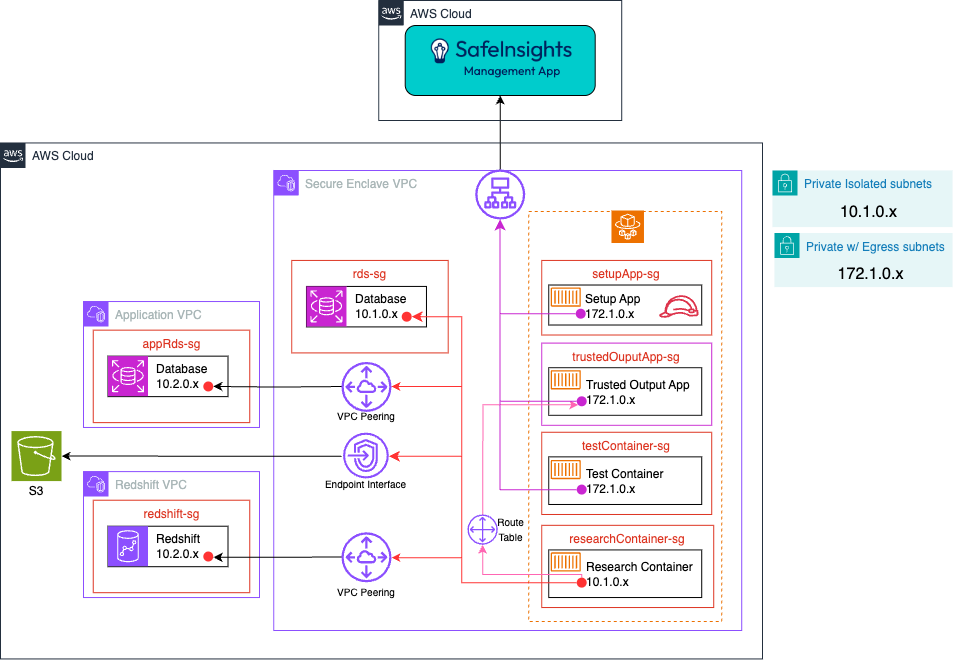 Where:
- The Setup App, Trusted Output App and Test Container connect to SafeInsights via an AWS VPC Public NAT Gateway, created by configuring the private subnets with egress.
- The Research Containers connect to the RDS Instance in the external VPC via AWS VPC Peering.
- VPC Peering was used in this case because it is more cost effective than an Endpoint Interface, but VPC peering is more permissive in networking than Endpoint Interfaces
- The Research Containers connect to the S3 bucket via an AWS S3 Gateway Endpoint.
- The Setup App will have an AWS IAM role to allow it to provision a task in AWS ECS Fargate.
- Datasets that are in EFS will be mounted as read-only to each research container when the Research Container is provisioned
- RDS Database credential are stored in Secret Manager
- Each Security Group will have the following rules:
- Block all ingress and egress traffic except defined ports
- setupApp-sg
- Ingress
- None
- Egress
- ManagementApp, HTTPS, 443
- Ingress
- trustedOutputApp-sg
- Ingress
- researchContainer-sg, TCP, 5000
- Egress
- ManagementApp, HTTPS, 443
- Ingress
- testContainer-sg
- Ingress
- None
- Egress
- ManagementApp, HTTPS, 443
- Ingress
- researchContainer-sg
- Ingress - None
- Egress - trustedOutputApp-sg, TCP, 5000 - other Security Groups required to access the data
AWS EC2 with Docker
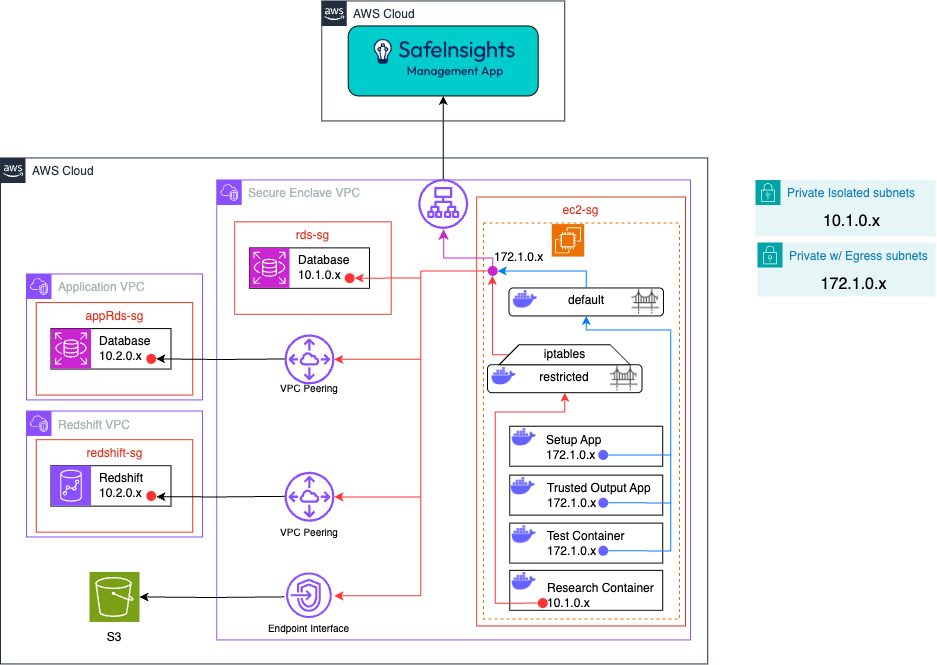 Where:
- The EC2 instance connects to SafeInsights via an AWS VPC Public NAT Gateway, created by configuring the private subnets with egress.
- The Research Containers are limited via or other firewall software running on the EC2 instance.
- is configured so that the egress traffic from the Research Container is limited to the ip address or hostnames for the datasets.
# Allow RC to access S3 (assuming S3 endpoint IP is 192.168.0.10 and uses port 443) sudo iptables -I DOCKER-USER -s 10.1.0.0/16 -d 192.168.0.10 -p tcp --dport 443 -j ACCEPT # Allow RC to access Redshift (assuming Redshift endpoint IP is 10.2.0.1 and uses port 5439) sudo iptables -I DOCKER-USER -s 10.1.0.0/16 -d 10.2.0.1 -p tcp --dport 5439 -j ACCEPT # Allow RC to access RDS (assuming RDS endpoint IP is 10.2.0.2 and uses port 5439) sudo iptables -I DOCKER-USER -s 10.1.0.0/16 -d 10.2.0.2 -p tcp --dport 5439 -j ACCEPT # Finally, drop all other outbound traffic from RC's network sudo iptables -A DOCKER-USER -s 10.1.0.0/16 -j DROP</code> - The RDS Instance in the external VPC via AWS VPC Peering.
- VPC Peering was used in this case because it is more cost effective than an Endpoint Interface, but VPC peering is more permissive in networking than Endpoint Interfaces
- The Research Containers connect to the S3 bucket via an AWS S3 Gateway Endpoint.
- The Setup App will have permissions to enable it to provision a researcher container on the EC2 instance.
- The EC2 Security Group will have the following rules:
- Block all ingress and egress traffic except defined ports
- ec2-sg
- Ingress
- None
- Egress
- ManagementApp, HTTPS, 443
- other Security Groups required to access the data
- Ingress
AWS EKS
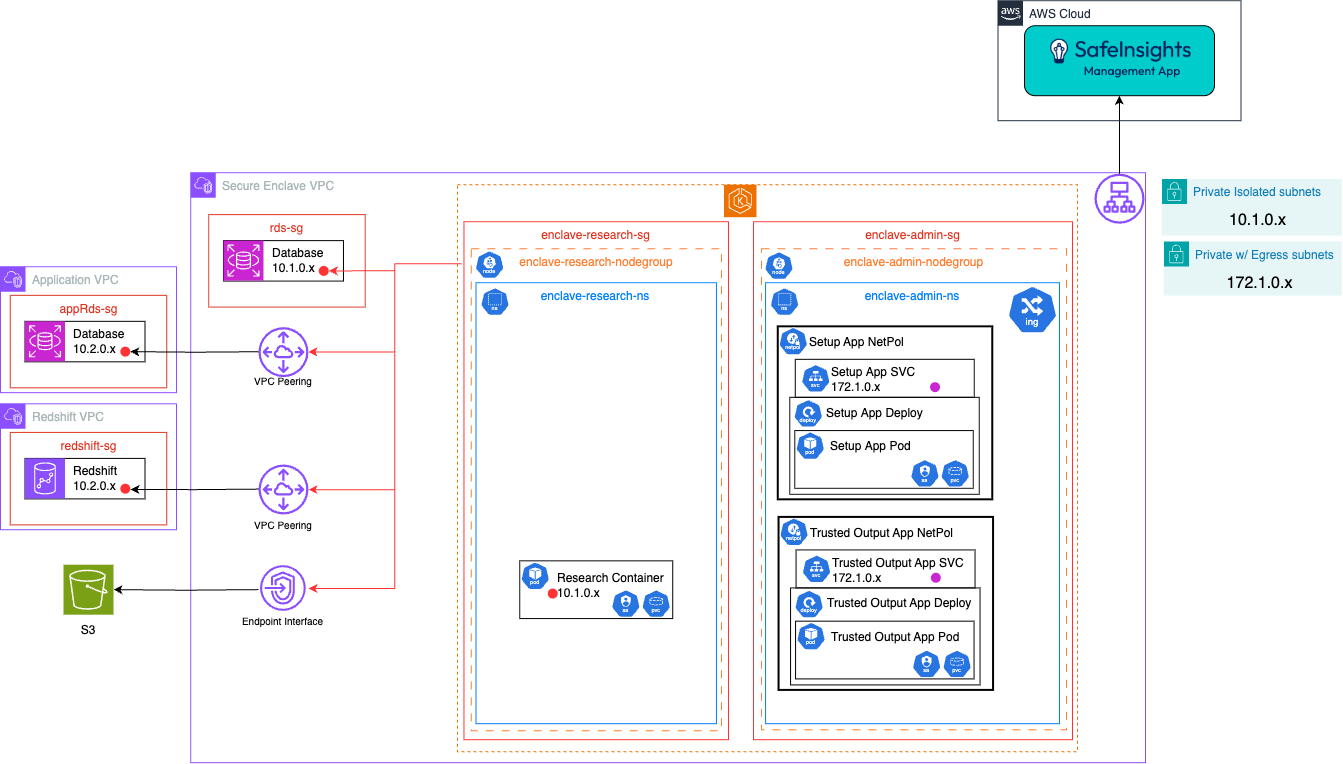
- The SafeInsights Apps are deployed via helm chart.
- The Setup App, Trusted Output App and Test Container connect to SafeInsights via an AWS VPC Public NAT Gateway, created by configuring the private subnets with egress.
- The Research Containers connect to the RDS Instance in the external VPC via AWS VPC Peering.
- VPC Peering was used in this case because it is more cost effective than an Endpoint Interface, but VPC peering is more permissive in networking than Endpoint Interfaces
- The Research Containers connect to the S3 bucket via an AWS S3 Gateway Endpoint.
- The Setup App will have a K8s service account to allow it to launch a pod template for the Research Container.
- Datasets that are in EFS will be mounted as read-only to each Research Container when the Research Container is provisioned.
- RDS Database credential are stored in AWS Secret Manager or as a Kubernetes secret.
- The Helm chart will deploy a network policy to restrict the Kubernetes traffic with the following rules:
- to be determined
- Each Security Group will have the following rules:
- Block all ingress and egress traffic except defined ports
- enclave-admin-sg
- Ingress
- None
- Egress
- ManagementApp, HTTPS, 443
- Ingress
- enclave-research-sg
- Ingress
- None
- Egress
- enclave-admin-sg, HTTPS, 443
- rds-sg, TCP, 5432
- appRds-sg, TCP, 5432
- redshift-sg, TCP, 5000
- Ingress
On Premise (On Prem) Base Enclave Designs
On Prem Dataset Case Studies
- NAS
- Database
- NFS
On Prem, Virtual Machines
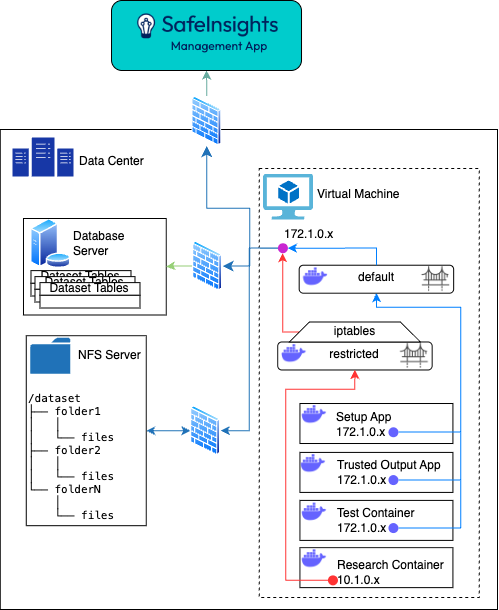
Where:
- The Virtual Machine is provisioned using the existing technology used in the Member's datacenter
- Networking is segmented using the same technology currently used in the Member's datacenter; represented by firewalls in this image.
- The Research Containers are limited via or other firewall software running on the EC2 instance.
- is configured so that the egress traffic from the Research Container is limited to the ip address or hostnames for the datasets.
# Allow RC to access S3 (assuming S3 endpoint IP is 192.168.0.10 and uses port 443)
sudo iptables -I DOCKER-USER -s 10.1.0.0/16 -d 192.168.0.10 -p tcp --dport 443 -j ACCEPT

# Allow RC to access Redshift (assuming Redshift endpoint IP is 10.2.0.1 and uses port 5439)
sudo iptables -I DOCKER-USER -s 10.1.0.0/16 -d 10.2.0.1 -p tcp --dport 5439 -j ACCEPT

# Allow RC to access RDS (assuming RDS endpoint IP is 10.2.0.2 and uses port 5439)
sudo iptables -I DOCKER-USER -s 10.1.0.0/16 -d 10.2.0.2 -p tcp --dport 5439 -j ACCEPT

# Finally, drop all other outbound traffic from RC's network
sudo iptables -A DOCKER-USER -s 10.1.0.0/16 -j DROP</code>
On Prem, Kubernetes
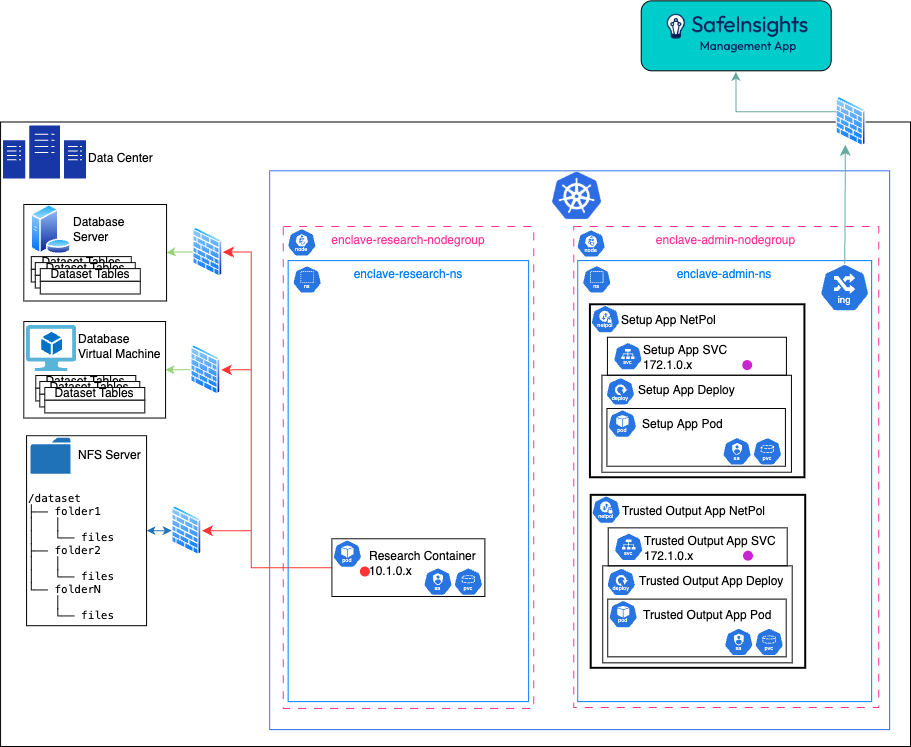 Where:
- The SafeInsights Apps are deployed via helm chart
- The Dataset Physical Volume (PV) is a ReadOnlyMany Storage class
- Networking is segmented using the same technology currently used in the Member's datacenter; represented by firewalls in this image.
- The Helm chart will deploy a network policy to restrict the K8s traffic with the following rules:
- to be determined
Azure Base Enclave Designs
Resource for choosing an Azure compute service.
Azure Dataset Case Studies
- Storage Accounts
- Managed Database Server
- Synapse Analytics
Azure Kubernetes Service (AKS)
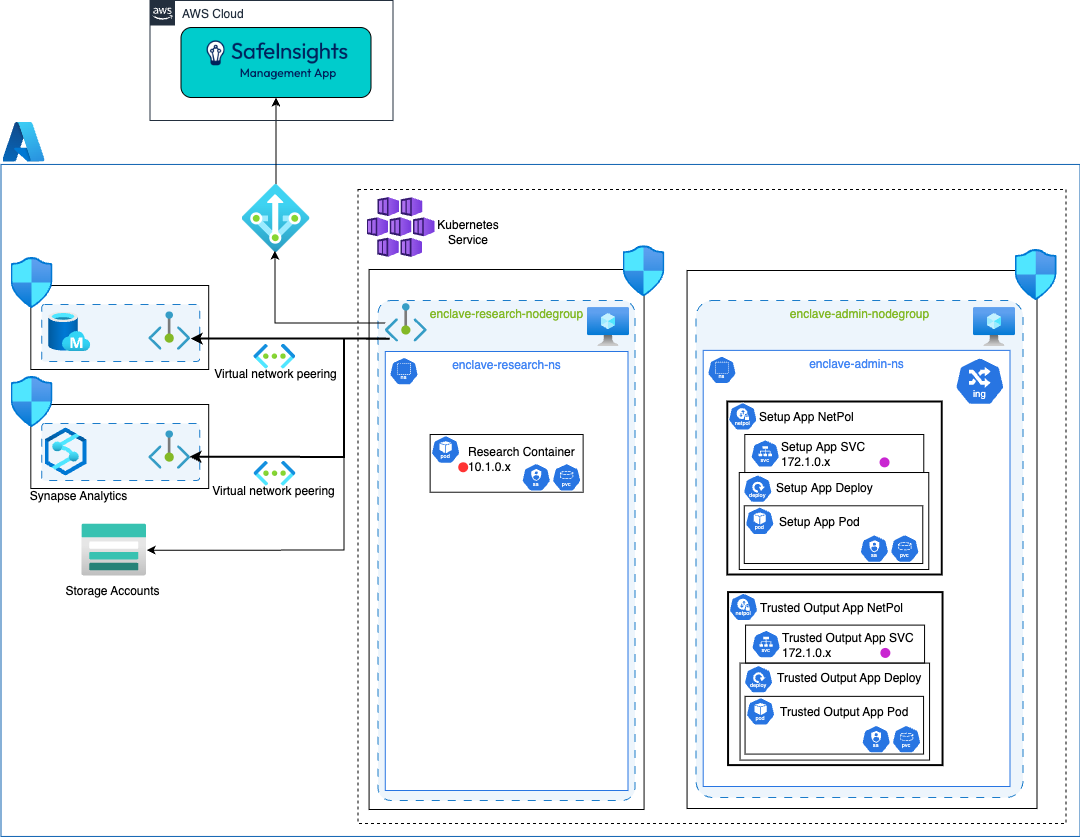
Where:
- The SafeInsights Apps are deployed via helm chart
- The Dataset Physical Volume (PV) is a ReadOnlyMany Storage class
- Azure Virtual Network Peering is used to connect different Private Endpoints.
- The helm chart will deploy a network policy to restrict the Kubernetes traffic with the following rules:
- to be determined
- Each Azure Network Security Group have the following rules:
- Block all ingress and egress traffic except defined ports
- enclave-admin-sg
- Ingress
- None
- Egress
- ManagementApp, HTTPS, 443
- Ingress
- enclave-research-sg
- Ingress
- None
- Egress
- enclave-admin-sg, HTTPS, 443
- mysql-sg, TCP, 3306
- synapse-analytics-sg, TCP, XXXX
- Ingress
Azure Virtual Machine
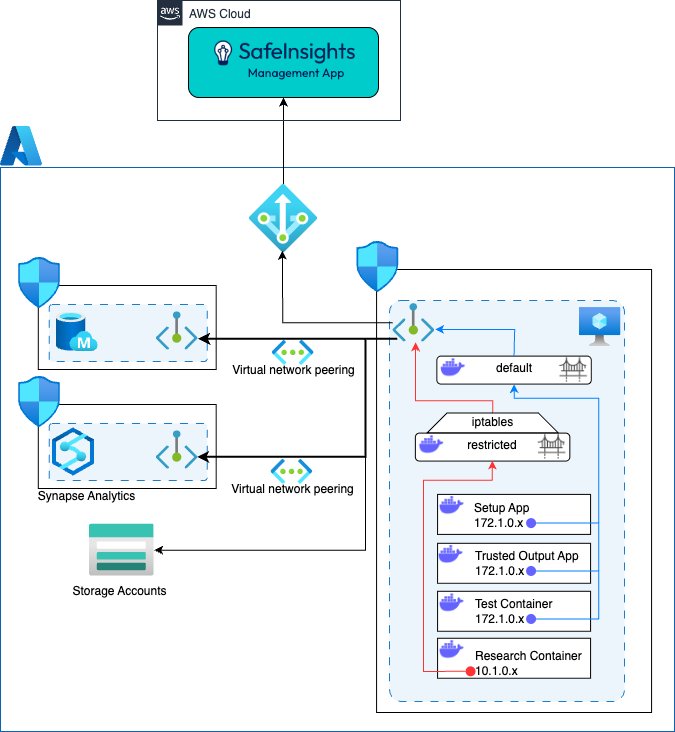
Where:
- Azure Virtual Network Peering is used to connect different private network interfaces.
- The Research Containers are limited via or other firewall software running on the EC2 instance.
- is configured so that the egress traffic from the Research Container is limited to the ip address or hostnames for the datasets.
# Allow RC to access S3 (assuming S3 endpoint IP is 192.168.0.10 and uses port 443)
sudo iptables -I DOCKER-USER -s 10.1.0.0/16 -d 192.168.0.10 -p tcp --dport 443 -j ACCEPT

# Allow RC to access Redshift (assuming Redshift endpoint IP is 10.2.0.1 and uses port 5439)
sudo iptables -I DOCKER-USER -s 10.1.0.0/16 -d 10.2.0.1 -p tcp --dport 5439 -j ACCEPT

# Allow RC to access RDS (assuming RDS endpoint IP is 10.2.0.2 and uses port 5439)
sudo iptables -I DOCKER-USER -s 10.1.0.0/16 -d 10.2.0.2 -p tcp --dport 5439 -j ACCEPT

# Finally, drop all other outbound traffic from RC's network
sudo iptables -A DOCKER-USER -s 10.1.0.0/16 -j DROP</code>
Google Cloud Platform (GCP) Enclave Designs
GCP Dataset Case Studies
- Cloud SQL
- Cloud Storage
- BigQuery
Google Kubernetes Engine (GKE)
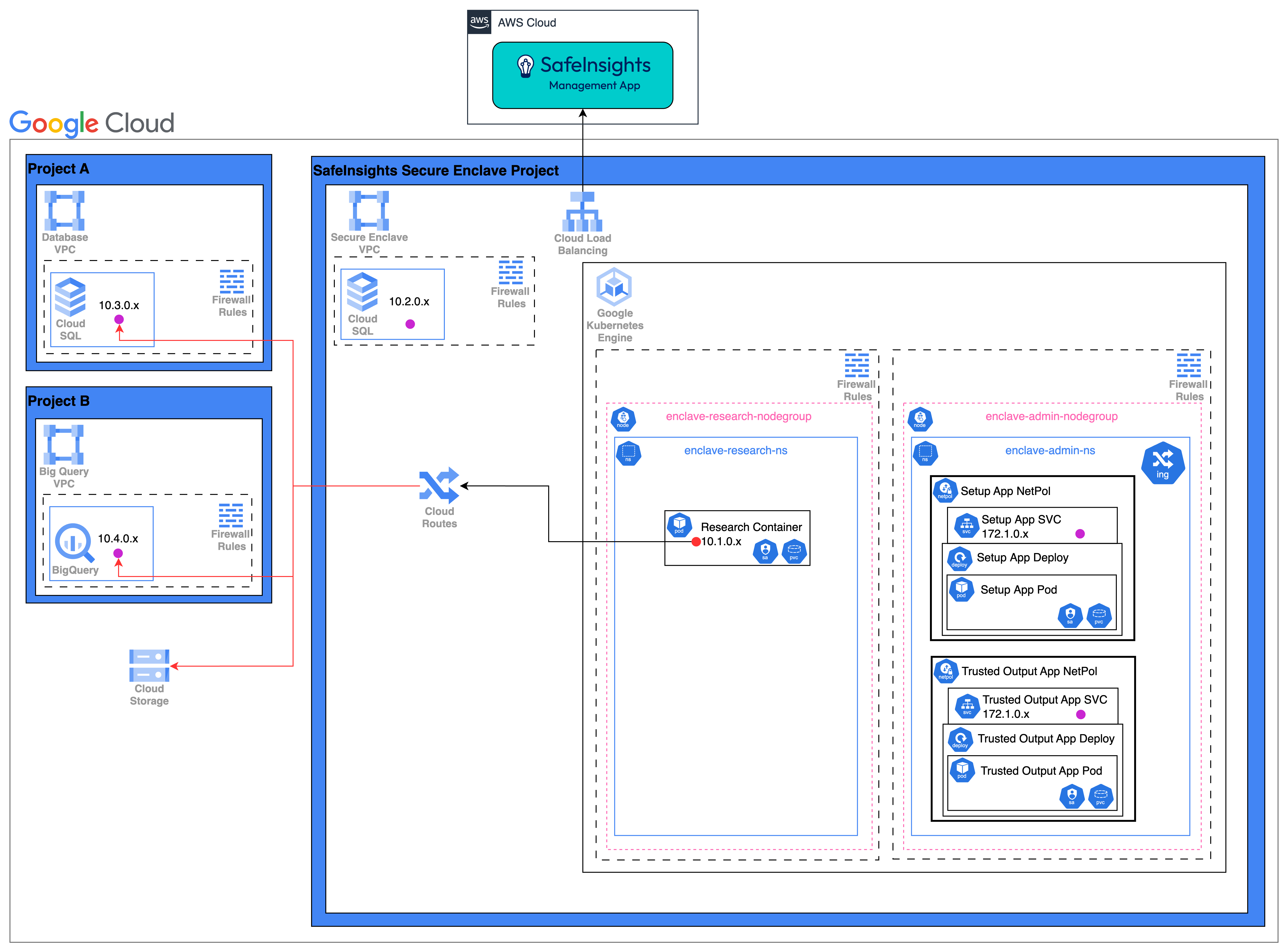
Where:
- The SafeInsights Apps are deployed via helm chart
- The Dataset Physical Volume (PV) is a ReadOnlyMany Storage class
- Azure Virtual Network Peering is used to connect different Private Endpoints.
- The helm chart will deploy a network policy to restrict the Kubernetes traffic with the following rules:
- to be determined
- Each GCP Firewall have the following rules:
- Block all ingress and egress traffic except defined ports
- enclave-admin node group
- Ingress
- None
- Egress
- ManagementApp, HTTPS, 443
- Ingress
- enclave-research node group
- Ingress
- None
- Egress
- enclave-admin node group, HTTPS, 443
- projectA-CloudSQL, TCP, 5432
- projectB-BigQuery, TCP, XXXX
- Ingress
Google Virtual Machine
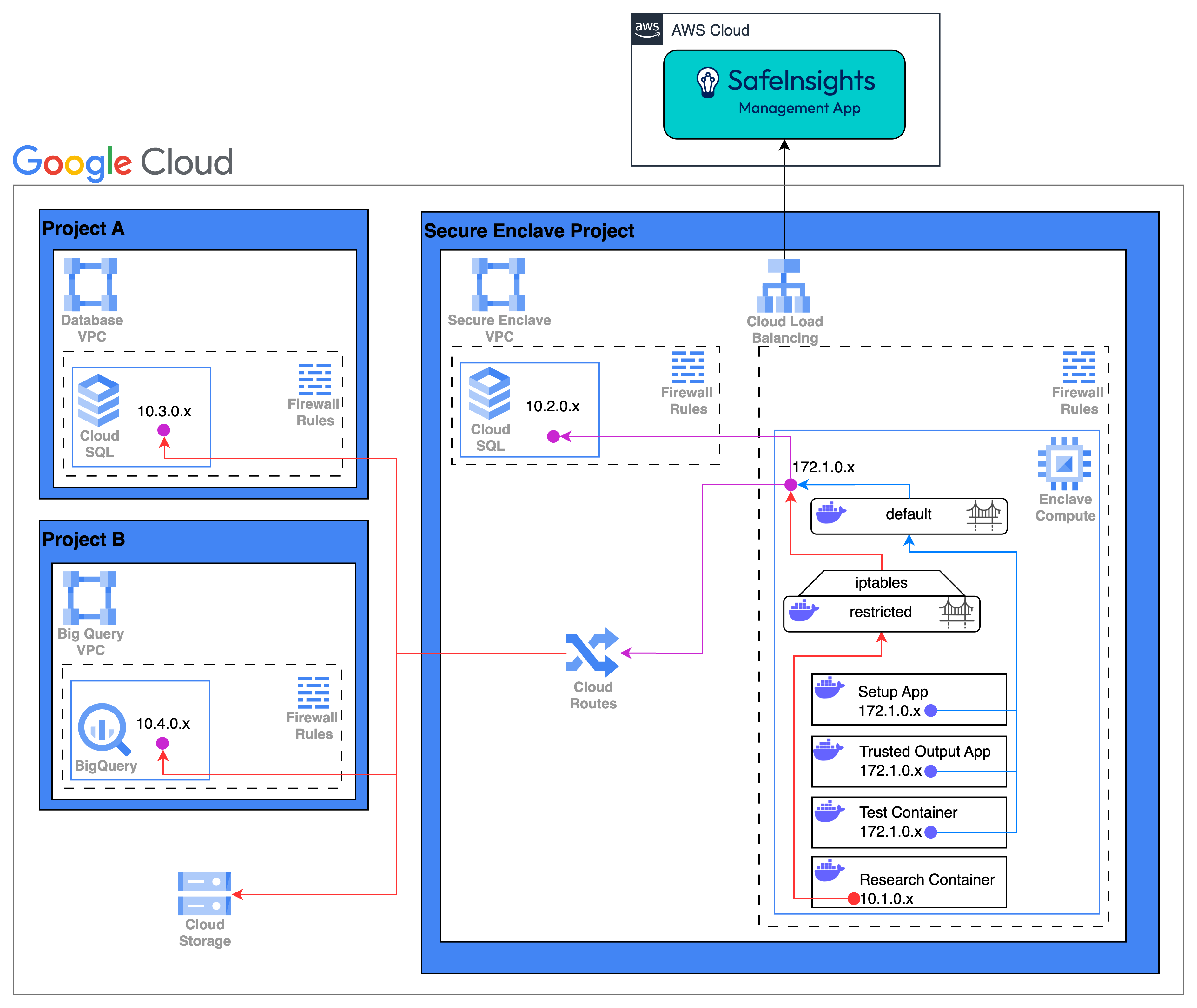
Where:
- Cloud Routes is used to connect different private network interfaces in different GCP Projects.
- The Research Containers are limited via or other firewall software running on the EC2 instance.
- is configured so that the egress traffic from the Research Container is limited to the ip address or hostnames for the datasets.
# Allow RC to access S3 (assuming S3 endpoint IP is 192.168.0.10 and uses port 443)
sudo iptables -I DOCKER-USER -s 10.1.0.0/16 -d 192.168.0.10 -p tcp --dport 443 -j ACCEPT

# Allow RC to access Redshift (assuming Redshift endpoint IP is 10.2.0.1 and uses port 5439)
sudo iptables -I DOCKER-USER -s 10.1.0.0/16 -d 10.2.0.1 -p tcp --dport 5439 -j ACCEPT

# Allow RC to access RDS (assuming RDS endpoint IP is 10.2.0.2 and uses port 5439)
sudo iptables -I DOCKER-USER -s 10.1.0.0/16 -d 10.2.0.2 -p tcp --dport 5439 -j ACCEPT

# Finally, drop all other outbound traffic from RC's network
sudo iptables -A DOCKER-USER -s 10.1.0.0/16 -j DROP</code>